

Posted by Peter
17 September 2015 Well in short. A lot!
Gravity Forms add-on framework
Version 2.0 is a big re-write of some parts of the plugin, the update now works inside the add-on framework that Gravity Forms provides.
This means that the interface is exactly like many of add-ons that you may be familiar with. The plugin has a settings page inside the Gravity Forms settings and the mapping of forms is now in the feed style that Gravity provides.
The screenshot below shows the new Feed Settings provide by the 2.0 update.
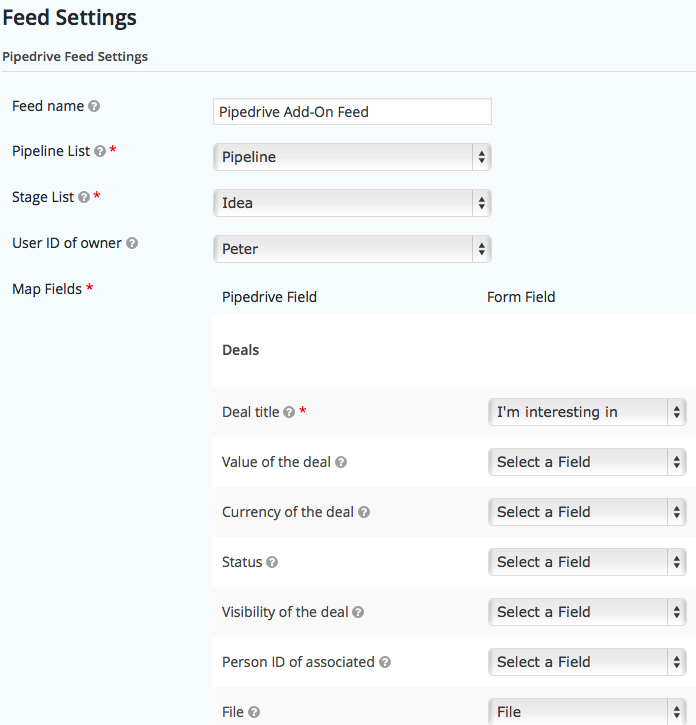
The Pipedrive Add-on can be enabled on each of your forms in the same way that other add-ons work, the screenshot below shows the access to the feed settings.

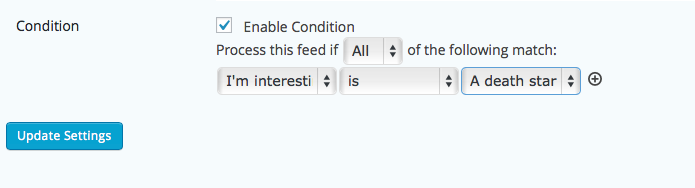
Conditional Logic
Because the plugin now uses the add-on framework you have access to apply conditions to each of your feeds. This means that instead of sending all form entires to Pipedrive, you can set condition for which ones should be sent and which should not.
Easier access to Pipedrive settings
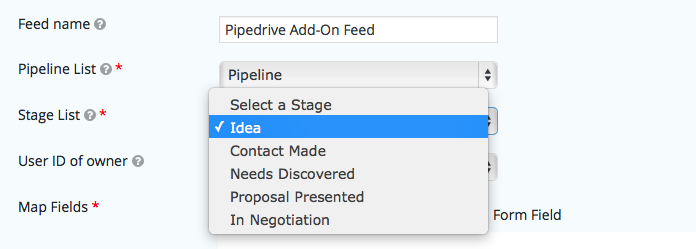
Settings like the owner of the deal, the stage that the deal should be assigned to and the list it should be inserted into are now all available as dropdown menus. This makes it a lot easier to quickly setup each form.
How to get the update
As usual this is a free update for all users with a current license. If you visit your WordPress dashboard and move into the Updates or Plugin interface you will see the update available.
If you are updating from version 1.x we do recommend that you check each of your forms mapping to ensure that it’s configure the way you prefer after installing the update.

Lottie Player for WordPress is here!
Lottie Player adds support for Lottie files in your WordPress website. Upload and manage Lottie files directly within your WordPress dashboard, then embed the lightweight Lottie animation on the front end of your website using a block or via a shortcode.