

Google Author Link: a new WordPress plugin

google author linksMany of the plugins that we create are to solve problem for our clients, so while building WordPress websites we always keep an eye on ideas to help us and to help other WordPress users.

Google has been trialling a system, Google Authorship,  where they link a profile on Google Plus to the web sites that a user contributes to. They also require the website in question to link back to the Google Plus profile.

So today, we’ve released a WordPress plugin that quickly and easily allows you to hook up your website with your Google Plus profile.

There is a lot of chatter around the internet about the SEO benefits of content that is linked with Google Authorship, so there’s some more reading on that topic, suffice to say it will probably help your rankings in the search engine.
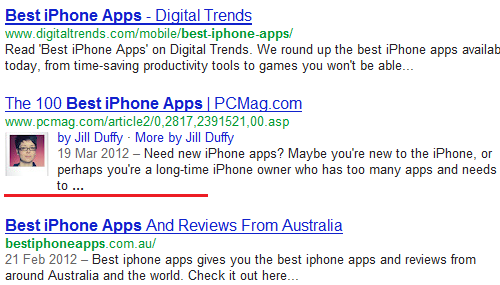
What does it look like?

Take a look at the screen shot here, when your web site is shown up in Google search results your profile will be displayed link this.

How to setup the plugin

So here’s a quick step by step guide on how to set this up.

Download the plugin.

Go to your Google Plus profile and edit the profile, ensure that you add your web site to the section “Contributor”. This tells Google that you’re an author for the particular site.

Then configure the plugin, basically editing your user profile in WordPress to add your Google Plus Profile URL.

Then take one of your URLs from your site and paste into Google’s Rich snippet tool, all being well that should confirm that your setup is correct.

Comments

  1. Thanks for making this plugin! In the settings, I see two fields: Google Profile URL and Google+. What info should I put in each field?

  2. Oops, nevermind, it seems like the Google+ field comes from Yoast’s SEO plugin. Thanks again!

  3. I’ve done all this and the author box still doesn’t show. Any more ideas?

  4. I have been using the Google Author Link plugin and it has been working very well. After reading some forum posts about the AuthorRank being released by Google in the future, I would like to request a field for the rel=publisher attribute. All my articles are specifically for a single company and instead of it being just paired with my personal G+ account, I would also like to add the rel=publisher attribute to give the company credit as well since technically it is theirs.

    • Tamra

      Thanks for your comments, we are going to be adding new features to this plugin shortly.

      Certainly will be adding rel=publisher attribute

      Look out for an update soon

  5. Tried to use your plugin had this issue thou?
    Linked author profile: https://plus.google.com/%E2%80%8Bu%E2%80%8B/%E2%80%8B0%E2%80%8B/108451944123349552428%E2%80%8B
    Error: Author profile page does not have an authorship link to a Google Profile

  6. I was able to get the plug-in to work on one site, but not the other. The test failed. I’d really appreciate any suggestions.

  7. I’ve added your Plugin and I can see my profile picture in the preview testing tool but I’m also getting some errors. Could you tell me how to fix the following errors:
    Warning: Missing required field “updated”.
    Warning: Missing required hCard “author”.

  8. Was hoping this plugin would work but for the life of me I couldn’t get it to work on my site. There must be some conflict with the theme I’m using. Is that possible?

    Travis Van Slooten

  9. Wasn’t able to get the Author link plugin working at first. Thanks for tut.

  10. Hi all.

    We’ve released an update today that adds support for Google Publisher Profiles

    Head over to the blog for info….

  11. My image shows in the Rich Snippet Preview. It also shows additional posts and it shows the following errors;

    Warning: Missing required field “updated”.

    Warning: Missing required hCard “author”.

    Warning: At least one field must be set for HatomEntry.

    Warning: Missing required field “entry-title”.

    Warning: Missing required field “updated”.

    Warning: Missing required hCard “author”.

    How can these errors be corrected? Thanks.

  12. It worked on the first url I put in, but then I randomly choose another of my posts and it said it wasn’t verified. Shouldn’t it cover all of the posts in my domain? Hmm… did I do something wrong?

    • Hi Becky.

      Yes it should work for all your posts.

      In your WordPress setup, are you the author for all the posts? Remember that the plugin works for multiple author blogs so each posting author needs to fill in their Google + profile URL

  13. Hi I’m just wondering, if you know how to get the LinkedIn Field to work on the bio, whenever I input my link for my profile it then try testing it on the author bio it just leads me to a LinkedIn page which says profile not found.
    My name an everything is correct since I copied and pasted it from the link.
    Is it to do with the way linkedin.com/pub/ is not present because the plugin puts linkedin.com/In/..

    • Hi Alex, but the linked in field that you’re referring too, is not part of our plugin, so not really sure about how to help on that one :)

  14. I am using this plugin, but currently it’s not working. Does it still have any incompatibility with Yoast SEO plugin?

Speak Your Mind

*