




Posted by Peter
10 February 2016This release is a large rewrite of our category image management plugin for WordPress and we’re excited that it’s now ready to release. For all users with a current license this update is free and is now available. Visit the Plugin section of your WordPress dashboard to use the automatic updater.
In this post we’ll cover some of what’s new in version 2.0.
Taxonomy meta data
WordPress has been recently updated to allow storage of meta data against taxonomies (think categories and tags). Much of the re-write in this plugin is to update our plugin to take advantage of this new method of storing data inside WordPress.
 We have included a migration tool with this update, it will automatically detect when you’re using WordPress 4.2 and conduct a migration of the featured images data.
If you’re not a developer this might all sound a bit nerdy, in short this is a much better way to store data that relates to taxonomies (categories / tags etc. ). Saving and retrieving the data is much more efficient.
New Features
Featured colours
Along with the ability to set a featured image for a category or tag, we also now support setting a featured colour for a category. The screenshot below shows this new feature in the category editor.
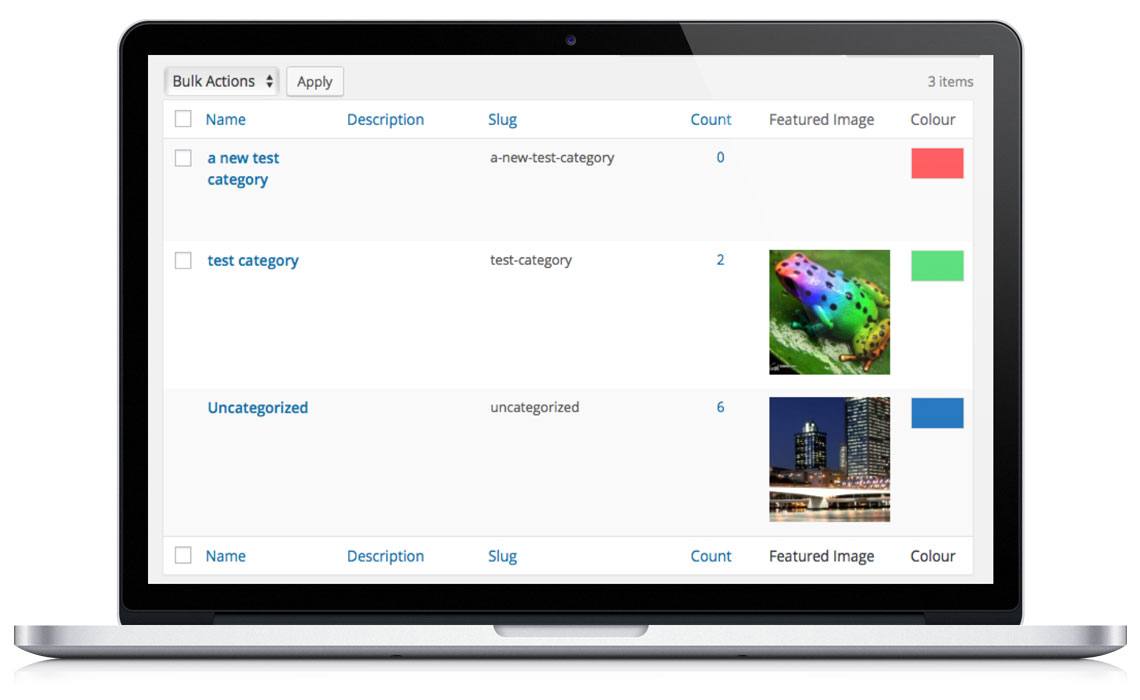
Category manager interface
You’ll notice in above image, that we also show featured images in the category manger interface now. This makes it a lot easier to see which of your categories have an image and / or a colour set.
Developer API
Now that you can save colours and images for each category you’ll want to be able to access these assets and use them when working on your WordPress theme. We have a number of code examples that show you easily how to do this.
Updated documentation
Our core documentation for the plugin has also been updated this week. It lists all of the shortcode settings, how to use the widgets as well as basic setup of the plugin.
If you’re new to Featured Images for Categories Pro visit the plugin’s home page.

Lottie Player for WordPress is here!
Lottie Player adds support for Lottie files in your WordPress website. Upload and manage Lottie files directly within your WordPress dashboard, then embed the lightweight Lottie animation on the front end of your website using a block or via a shortcode.