



Posted by Peter
27 June 2014Version 1.5 of Google Author Link now available
Today, we’ve released an update to our free Google Authorship plugin Google Author Link.
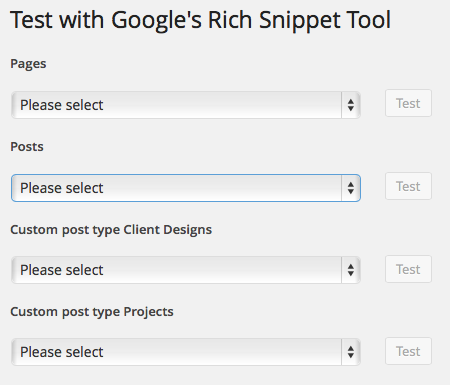 In this update we’ve added a new tool for testing your authorship configuration. Right inside the settings page you can test pages, posts and even custom post types.
The tool (pictured opposite) shows you each of these content types, just choose one and click Test.
Also in this update we squashed a few bugs when the plugin interacts with 404 pages or search. There was also a small problem in the settings within the Advanced Authorship Settings – you’re now able to reset your choices if you need to start again.
Not familiar with this plugin?
If you’ve not used our authorship plugin for WordPress here’s the quick run down.
It’s freely available from the WordPress.org plugin repository and when installed provides a simple to use set of tools to connect your WordPress website with your Google+ profile.
Visit the plugin’s home page here or read more about the plugin in our blog.
Changes to Google Authorship
Probably the thing people associate more than anything with Google Authorship is the display of the author’s photo and mini bio in the search results. However it looks like this display is about to change.

Google has announced this week that there will be some change to the way that they show search results that will effect users of authorship.
I was a bit surprised to read it but they’re planning on removing the photos that is synonymous with authorship, no longer displaying it within search results.
Read the announcement and some of the ensuing discussion here.

Lottie Player for WordPress is here!
Lottie Player adds support for Lottie files in your WordPress website. Upload and manage Lottie files directly within your WordPress dashboard, then embed the lightweight Lottie animation on the front end of your website using a block or via a shortcode.