




Posted by Peter
03 May 2023Version 3.9 is a juicy one! Some great new features, some improvements to existing functionality and its all free for users with a current license!
Let’s dig into some of the new features.
Pipedrive Picture Field
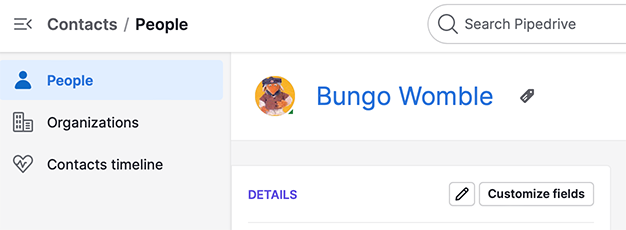
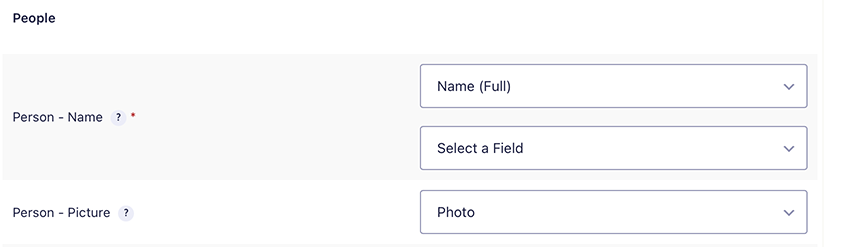
Pipedrive allows you to assign a picture to a contact within the CRM, their API now also supports this so we’ve added for you! When a form entry is submitted you can have a user upload an image file that will become their avatar within Pipedrive CRM.
This is how the picture is displayed with a contact record.
And this! … is the new field that we have added to the form mapping interface.
Learn more about this feature in our documentation library here.
Multiple File Uploads
Next up we have upsized your file uploads!
In the past you were only able to assign one file upload field at a time. We have update the file handling so you’re able to assign multiple files that will be attached when the form is submitted. Different data types (think organisation, people, deals etc. ) all have a file upload field, they’ve all been updated to handle multiple files.

As you assign a field, you will see that it’s listed on top of the mapping, leaving the drop down available for you to add other fields as you need to.
Learn more about this feature in our documentation section.
Debugger improvements
Over the past couple of releases we have been working on our debugger. This is the tools that we use (and you can use) when something is not working as expected. We have added more detailed information to the email notices that are generated when the debugger is enabled.
As always, look for the update in your Plugin interface of WordPress!

Lottie Player for WordPress is here!
Lottie Player adds support for Lottie files in your WordPress website. Upload and manage Lottie files directly within your WordPress dashboard, then embed the lightweight Lottie animation on the front end of your website using a block or via a shortcode.