




Posted by Peter
22 December 2014 Just in time for Christmas!
We have released version 3.2 of our popular stock market plugin for WordPress WP Stock Ticker.
Control the order of the ticker symbols
The featured added in 3.2 is the ability to easily control the order of the stock symbols. This feature is in direct response to a phone call I had with a user a couple of weeks go. It’s true of many software development projects, those who make the software don’t see the glaring, obvious features that need to be there.
Previously if you had a number of stocks setup for a static display or a scrolling ticker, there was no easy way to adjust the order. Now we’ve create an enhancement to the settings page that can be seen below.
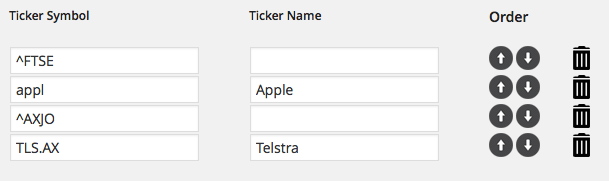
Click the up and down arrows and you’re able to re-order the stocks, currencies and other ticker symbols that you’re displaying in your WordPress site.
How to get the upgrade
Version 3.2 is available as a free update for all users with a current license. In your WordPress dashboard head over to the plugin page and you will see 3.2 there as an update.
Learn more about WP Stock Ticker
If you’re new to the plugin check out the main page here that shows the features, also review the documentation page that is located here – it shows you in more detail how the plugin is setup.

Lottie Player for WordPress is here!
Lottie Player adds support for Lottie files in your WordPress website. Upload and manage Lottie files directly within your WordPress dashboard, then embed the lightweight Lottie animation on the front end of your website using a block or via a shortcode.