




Posted by Peter
01 September 2015 Today we have released an update to our WordPress stock market plugin WP Stock Ticker Pro.
New shortcode features
The new version (3.3) has new shortcode features to toggle the display of charts.
The plugin supports two modes of operation; a scrolling ticker and a static display of stock quotes. For each of these there is a setting on the plugin’s setting page that allows you to enable or disable the display of charts.
When using a WordPress shortcode to insert the ticker into your page or post you can now set another attribute on the shortcode to toggle or override the default behaviour.

Scrolling Ticker
When working with a scrolling ticker use the following syntax:
[s_ticker_display chart=’yes’]
[s_ticker_display chart=’no’]
When working with a static block of quotes the following syntax now allows you to turn charts on or off:
[s_static_display chart=’yes’]
[s_static_display chart=’no’]
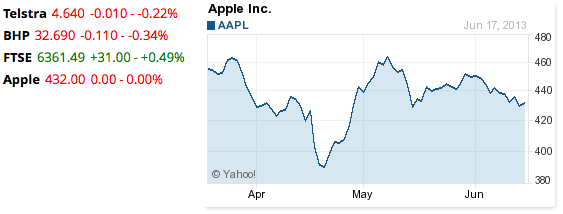
Static Display with charts
Compatibility with WordPress 4.3
The new version also provides full support for 4.3. Older versions of the plugin may have problems displaying widget stock tickers on WordPress 4.3
How to get the update
The update is a free update for all users with current licences. Visit the Updates or Plugin section of your WordPress dashboard to accept the automatic update available there.

Lottie Player for WordPress is here!
Lottie Player adds support for Lottie files in your WordPress website. Upload and manage Lottie files directly within your WordPress dashboard, then embed the lightweight Lottie animation on the front end of your website using a block or via a shortcode.