
Posted by Peter
29 April 2014We have released today an update to our Google Analytics form plugin.

 New to this plugin?
If you’re not familiar with this plugin, it’s worth taking a quick look – particularly if you use Google Analytics and have one or more forms on your WordPress website.
Here is the quick introduction!
Google Analytics sets a cookie when users visit your site, this plugin give you access to the information inside that cookie to send through your web forms as hidden fields. Meaning that along side the enquiry from your website visitor you can see tracking information about how that person arrived at your site.
The cookie has information like:
- the referrer (the website that the user came from)
- if the user came from a Google Pay Per Click (PPC) ad it will show you they keyword used
- a user coming via a normal google search will show as “organic search”
- if you use the Google Analytics URL builder, all the data from this is available
- systems like MailChimp that add Google Analytics tracking, this data is also available
What’s new in version 2.5?
Better support for Gravity Forms users
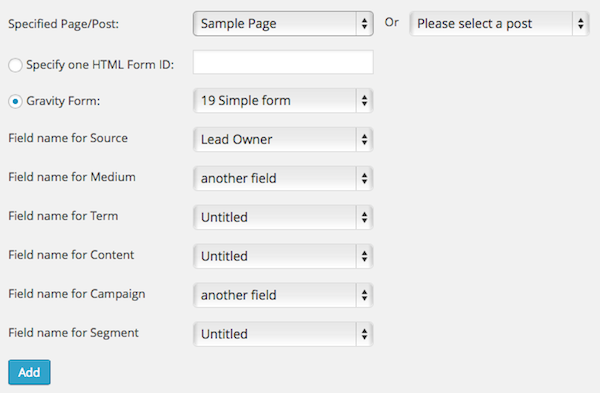
Many of our users also use Gravity Forms. In the release we’ve created a whole new interface that supports Gravity Forms forms with simple drop down menu to select both your forms and the fields for the tracking data.
Check the screen shot below for a preview of this new interface.
Exact control over which pages & forms to track
Previous to this version you could choose to load the tracking on all pages of your site or choose one form for a specific page. While you can still opt for all pages (great if you have a form in the sidebar across your site) there is now the option to target individual pages with specific forms.
Before you install the update…
We have altered how the plugin settings are stored in this update. As part of this we have a routine that will update your settings but depending on your setup you may need to reconfigure one or more of your form settings after this update is installed.
View the updated documentation
With this release we have updated the documentation for this plugin, visit the new docs located here for help and more screenshots from version 2.5.
How to get the update?
Visit the plugins page of your WordPress site and use the automatic update system there to download and install the new version of the plugin. Alternatively login to your account here and download the plugin manually.

Lottie Player for WordPress is here!
Lottie Player adds support for Lottie files in your WordPress website. Upload and manage Lottie files directly within your WordPress dashboard, then embed the lightweight Lottie animation on the front end of your website using a block or via a shortcode.