




Posted by Peter
11 July 2014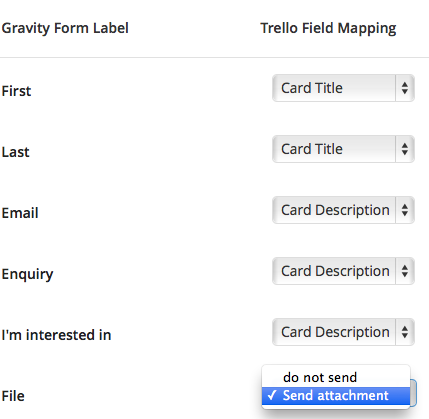 Since the release of Gravity Forms to Trello the most requested featured was to support attachments.
Today, we have released version 1.4 and the core of this update is to support sending attachments between Gravity Forms and a Trello card.
When you have a file upload field in Gravity Forms our plugin now detects that and gives you the option to send the attachment to Trello. Take a look at the screen shot below.
Easy!
How to get the update
All existing customers can update simply by visiting the plugin page in your WordPress dashboard and look for an update to version 1.4.
New to the plugin?
If you’re not familiar with this plugin, it’s another of our Gravity Forms add ons; allowing you to send form entries automatically from any Gravity Form. The entry will create a new card in Trello, in the board and the list that you select.
The plugins supports multiple mappings so you can have different forms going to different boards in your Trello account.
Learn more about Gravity Forms to Trello here.

Lottie Player for WordPress is here!
Lottie Player adds support for Lottie files in your WordPress website. Upload and manage Lottie files directly within your WordPress dashboard, then embed the lightweight Lottie animation on the front end of your website using a block or via a shortcode.