




Posted by Peter
18 October 2016Today we have released an exciting update for our WordPress stock market plugin – WP Stock Ticker Pro. This is a major update with lots of new features. As usual, many of these features have been requested by our current users, so we’re very happy to be able to respond with this update.
Let’s dig into what’s new!
Control the timeframe of market charts
We have supported the display of charts from Yahoo Finance for some time now. However with this update you can now control the timeframe of the data being charted.
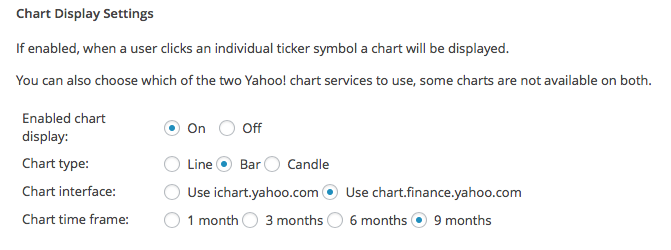
The chart displays settings (pictured below) now allows you to choose the timeframe from 1 month through to 9 months. Read more about the plugin’s chart ability here.
More control of price and movement
By default, the plugin will show the stock code (or company name), then the current price and finally the movement in cents and percentage.
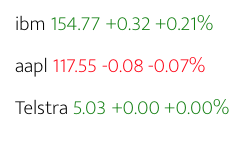
Some users have requested to be able to just show the price and that is all. With this update you can now do this. Look for a new option Display Options in the settings page.

You’re able to control this independently for your scrolling ticker and your static displays. More information on this feature is also available in the WP Stock Ticker Pro documentation here.
New widget – The Stock Tile
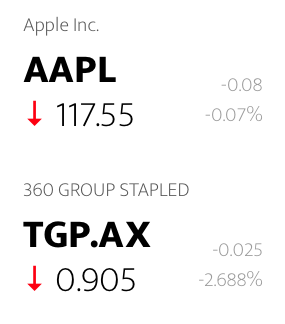 We have a great new widget that is also available with version 3.8. We call it a stock tile. It can be dropped into any of your WordPress widget areas and has a snazzy bold design, check it out here.
One or more company symbols can be displayed in a ticker. It’s responsive so will happily work within many different areas of your WordPress site.
The tile is populated with market codes that are setup in the plugin’s Advanced Display option.
Check out this new article in the documentation to learn more about the Stock Tile.
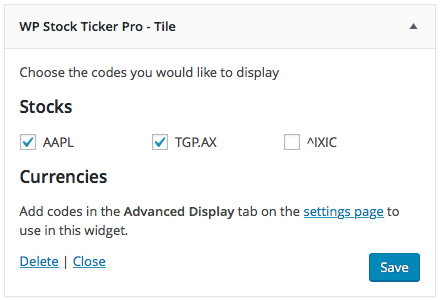
Learn more about the Stock Tile here.
Modern Style (CSS) option
We have shipped in version 3.8 a fresh style (CSS) option that can be optionally used in your WordPress site. In the settings page the plugin gives you the option to stick with the classic style or enable the new Modern option.
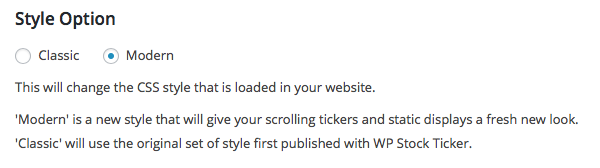
What we have tried to do with this new style option is remove some of the style options that were previously in place so that the plugin’s output will inherit more from your installed WordPress theme.
Updated Plugin Documentation
We are underway with a project to update the way that we manage and display our plugin documentation here on HelpForWP.com. The WP Stock Ticker Pro section has been launched. Along with the Getting Started Guide for the plugin there is now a dedicated section with more in depth articles for the plugin.\
How to get the 3.8 update?
This update is free for all users with a current WP Stock Ticker Pro licence. Visit the plugin or updates section inside your WordPress dashboard to begin the update. If you’re licence has expired simply renew it today. You too can get all the features of this update.
Chat to our support team if you need any help.

Lottie Player for WordPress is here!
Lottie Player adds support for Lottie files in your WordPress website. Upload and manage Lottie files directly within your WordPress dashboard, then embed the lightweight Lottie animation on the front end of your website using a block or via a shortcode.