




Posted by Peter
01 May 2018Today we have released a new version (2.8) of our popular Gravity Forms add on for Pipedrive.
Compatibility with Gravity Forms 2.3
This version is an important update as it adds support for Gravity Forms plugin 2.3.x series. The database tables that Gravity Forms uses have been updated, so an update of our add-on is required to keep things working.
It’s important to update to the latest version of Gravity Forms to Pipedrive when using the current version of Gravity Forms.
New Features
Pipedrive Activities
In this update we also add support for activities in Pipedrive. Now when adding contacts and deals you can also add an activity like a phone call to be automatically created for you. A great way to ensure your team is following up new leads coming into your system.
Activities can be created alongside deals and contact or as standalone objects. Learn more about activities in this new documentation article and video.
Synchronising data from Pipedrive fields into Gravity Forms
For the first time you can now pull data from Pipedrive down into your form fields in Gravity Forms. We are working on even more functionality here, including full support for Products in Pipedrive. However in version 2.8 data can be pulled in from standard fields and used as options in your form.
We have prepared some new documentation that details exactly how this new feature works, check it out here.
Duplicate checking
The last of the big three features in this version is new support for duplicate testing. Now you can choose to enable duplicate testing for people and organisations. Instead of creating a new record, if a duplicate is detected the new form entry will be assigned to an existing record (person or organisation).
Again we have a new article in the plugin’s documentation section that details how this feature works.
Entry logging
Update! We have released another minor update (version 2.8.5). We have been wanting for a while now to add logging to the plugin so that it’s clear exactly what is happening when the plugin communicates with Pipedrive’s API.
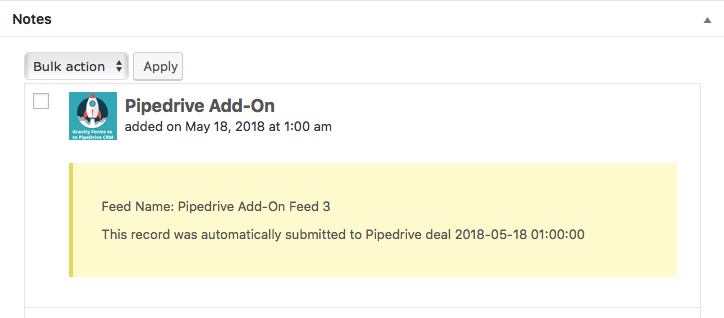
Now, each entry will have a note automatically added to show you exactly what happened during the transaction. See the screenshot here.
How to get the update
Version 2.8.5 is available free of charge to all users with a current licence. Look for the update in your WordPress dashboard, under the Plugins menu item.
If your licence has expired you can renew it by adding the plugin to your shopping cart here, then on the checkout enter your licence key, the system will renew your existing licence for you.
If you’re new to the plugin, it’s a popular Pipedrive CRM Gravity Forms Integration, learn more about how it works here.

Lottie Player for WordPress is here!
Lottie Player adds support for Lottie files in your WordPress website. Upload and manage Lottie files directly within your WordPress dashboard, then embed the lightweight Lottie animation on the front end of your website using a block or via a shortcode.